Project 1 - Inventory System (Console + API)
Tóm tắt: Dự án tổng kết Giai đoạn 2. Bạn xây một hệ thống quản lý kho chạy trên console: sản phẩm, danh mục, kho hàng, nhập kho, xuất kho, chuyển kho và lịch sử giao dịch lưu ra file JSON. Code chia thành bốn tầng (Domain, Application, Infrastructure, ConsoleApp) nối với nhau bằng Dependency Injection, mọi thao tác I/O đều async và nhận
CancellationToken. Điều quan trọng nhất: quy tắc nghiệp vụ (không xuất quá tồn, SKU không trùng) nằm trong service và được kiểm chứng bằng unit test, không nằm ở menu.
Mục tiêu bài học
Sau dự án này bạn có thể:
- Thiết kế entity, enum, exception cho một miền nghiệp vụ thật (quản lý kho).
- Tách solution thành nhiều project theo tầng và giải thích vì sao Domain không tham chiếu project nào.
- Viết repository async theo interface, đổi từ lưu trong bộ nhớ sang lưu file JSON mà không sửa service.
- Đăng ký service với đúng lifetime, kể cả class có constructor nhận
string, và resolve service Scoped qua scope. - Đặt quy tắc nghiệp vụ trong service, viết unit test xUnit chứng minh các quy tắc đó.
- Truyền
CancellationTokentừProgram.csxuống tận repository và tắt app gọn khi nhấn Ctrl+C.
Cần biết trước: bài 0.4 - Solution, thư viện và unit test, bài 4.4 - Interface, bài 4.7 - Records, bài 5.2 - Generics, bài 5.3 - LINQ, bài 6.4 - CancellationToken, bài 7.4 - Service Lifetimes, bài 7.5 - Registering Services.
1. Tổng quan dự án
Inventory Management System (IMS) là hệ thống quản lý hàng tồn kho, nghiệp vụ có mặt trong hầu hết phần mềm bán hàng và ERP. Hệ thống trả lời các câu hỏi:
- Kho đang có những sản phẩm (Product) nào, thuộc danh mục (Category) nào?
- Mỗi sản phẩm còn bao nhiêu ở từng kho (Warehouse)?
- Ai đã nhập kho (stock in), xuất kho (stock out), chuyển kho (transfer) lúc nào, số lượng bao nhiêu?
- Sản phẩm nào sắp hết để đặt hàng thêm?
Vì sao dự án này khép lại Giai đoạn 2?
| Kiến thức | Dùng ở đâu trong dự án |
|---|---|
| OOP (Module 4) | Entity kế thừa BaseEntity, interface cho repository, record cho DTO |
| Advanced C# (Module 5) | IRepository<T> generic, LINQ để lọc tồn kho và tính báo cáo, nullable reference types |
| Async (Module 6) | Đọc ghi file JSON async, CancellationToken từ Ctrl+C xuống repository |
| DI (Module 7) | Đăng ký service và repository, chọn lifetime, đổi in-memory sang JSON chỉ bằng một dòng đăng ký |
Kết quả là một ứng dụng chạy được, demo được và có test, không phải bài tập rời rạc.
2. Lộ trình và thời gian
Dự kiến 2 tới 3 tuần, mỗi tuần khoảng 6 tới 8 giờ. Mỗi mốc kết thúc bằng một commit (hoặc pull request) có dotnet build và dotnet test xanh.
| Mốc | Việc cần xong | Cách kiểm tra |
|---|---|---|
| Tuần 1, nửa đầu | Bước 1: tạo solution, 5 project, tham chiếu đúng chiều. Viết entity, enum, exception, interface repository (mục 5, 6) | dotnet build xanh. Domain không có ProjectReference nào |
| Tuần 1, nửa sau | Bước 2: repository in-memory. Bước 3: InventoryService cho product và nhập/xuất kho | Test TC-02, TC-03, TC-06, TC-07, TC-08 xanh |
| Tuần 2 | Bước 3 (tiếp): chuyển kho, báo cáo, xóa product. Bước 4, 5: menu console, Ctrl+C | Test TC-09, TC-10, TC-11 xanh. Demo TC-01 tới TC-05 qua menu |
| Tuần 3 (hoặc khi xong sớm) | Bước 2 option B: repository JSON. README. Một bài mở rộng ở mục 11 | Tắt app, chạy lại vẫn thấy dữ liệu. Tự chấm theo mục 12 |
3. Yêu cầu chức năng
3.1 Product và Category
| Chức năng | Mô tả |
|---|---|
| Thêm sản phẩm | Nhập tên, SKU, đơn vị, giá nhập, danh mục, mức tồn tối thiểu |
| Sửa sản phẩm | Cập nhật tên, SKU, giá, danh mục, mức tồn tối thiểu |
| Xóa sản phẩm | Soft delete: đặt IsDeleted = true, không xóa khỏi dữ liệu |
| Xem danh sách | Lọc theo danh mục, tìm theo tên hoặc SKU |
| Quản lý danh mục | Thêm, xem, xóa danh mục. Mỗi sản phẩm thuộc đúng 1 danh mục |
3.2 Warehouse và tồn kho
| Chức năng | Mô tả |
|---|---|
| Quản lý kho | Thêm kho, xem danh sách kho |
| Nhập kho | Tăng số lượng của 1 sản phẩm tại 1 kho |
| Xuất kho | Giảm số lượng, không cho xuất quá số đang tồn |
| Xem tồn kho | Tồn của từng sản phẩm tại từng kho, kèm giá trị (số lượng × giá nhập) |
| Chuyển kho | Chuyển số lượng từ kho A sang kho B |
3.3 Lịch sử giao dịch
| Chức năng | Mô tả |
|---|---|
| Ghi tự động | Mỗi lần nhập, xuất, chuyển kho tạo bản ghi StockTransaction |
| Xem lịch sử | Lọc theo sản phẩm và khoảng ngày |
| Không sửa, không xóa | Lịch sử chỉ được thêm vào (append-only) để còn đối chiếu khi có sai lệch |
3.4 Báo cáo
| Báo cáo | Bắt buộc? | Mô tả |
|---|---|---|
| Tồn kho hiện tại | Có | Tồn theo sản phẩm và kho (GetCurrentStockAsync) |
| Hàng sắp hết | Có | Sản phẩm có tổng tồn ở mọi kho ≤ MinStockLevel (GetLowStockAlertsAsync) |
| Top nhập/xuất | Không, xem Level 1 mục 11 | 10 sản phẩm nhập hoặc xuất nhiều nhất trong kỳ |
| Giá trị theo kho | Không, xem Level 1 mục 11 | Tổng giá trị hàng tồn của từng kho |
4. Kiến trúc đề xuất
Cấu trúc thư mục
InventorySystem/
├── InventorySystem.slnx              ← từ .NET 10, dotnet new sln tạo file .slnx
├── .gitignore
├── README.md
├── src/
│   ├── InventorySystem.Domain/          # Không tham chiếu project nào
│   │   ├── Entities/                    # BaseEntity, Product, Category, Warehouse, StockItem, StockTransaction
│   │   ├── Enums/TransactionType.cs
│   │   ├── Exceptions/InventoryException.cs
│   │   └── Interfaces/                  # IRepository<T>, IProductRepository, IStockRepository
│   │
│   ├── InventorySystem.Application/     # Tham chiếu Domain
│   │   ├── Abstractions/IInventoryService.cs
│   │   ├── DTOs/                        # Request và DTO dạng record
│   │   ├── Services/InventoryService.cs
│   │   └── DependencyInjection.cs       # AddApplicationServices()
│   │
│   ├── InventorySystem.Infrastructure/  # Tham chiếu Domain
│   │   ├── Persistence/                 # Repository in-memory và JSON
│   │   └── DependencyInjection.cs       # AddInfrastructureServices(dataDirectory)
│   │
│   └── InventorySystem.ConsoleApp/      # Tham chiếu Application và Infrastructure
│       ├── Program.cs
│       ├── Menus/MainMenu.cs
│       └── ConsoleHelper.cs
└── tests/
    └── InventorySystem.Tests/           # xUnit, tham chiếu Application và Infrastructure
IInventoryService nằm ở Application, không phải Domain. Lý do: các method của nó nhận và trả DTO (ProductDto, StockInRequest...) định nghĩa ở Application. Nếu đặt interface trong Domain thì Domain phải tham chiếu Application để thấy các DTO đó, trong khi Application đã tham chiếu Domain. Hai project tham chiếu nhau là phụ thuộc vòng, dotnet không cho build.
Project console tên InventorySystem.ConsoleApp, không đặt InventorySystem.Console. Nếu đặt tên kia, namespace InventorySystem.Console sẽ che class System.Console và mọi dòng Console.WriteLine trong thư mục Menus/ báo lỗi CS0234 (xem mục 10).
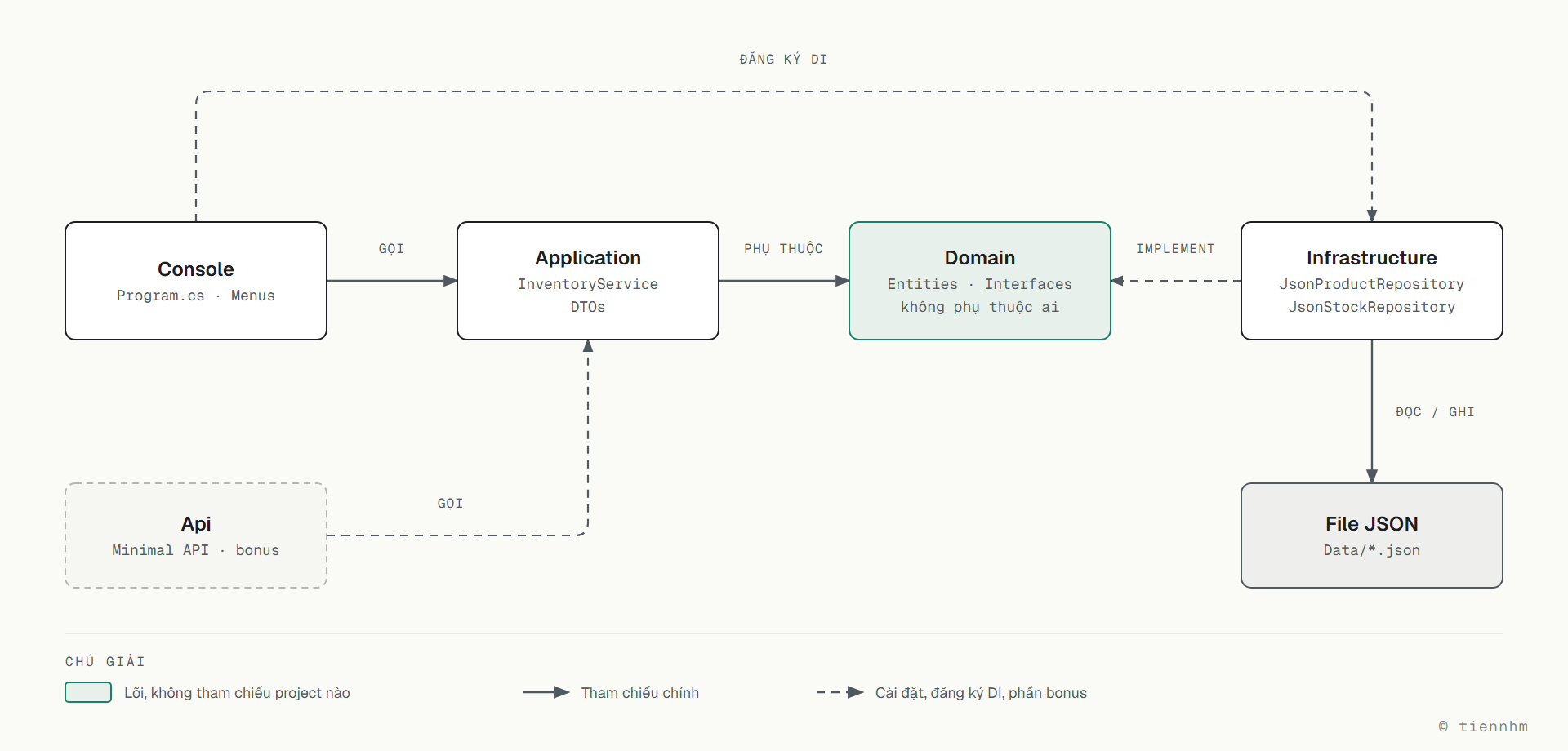
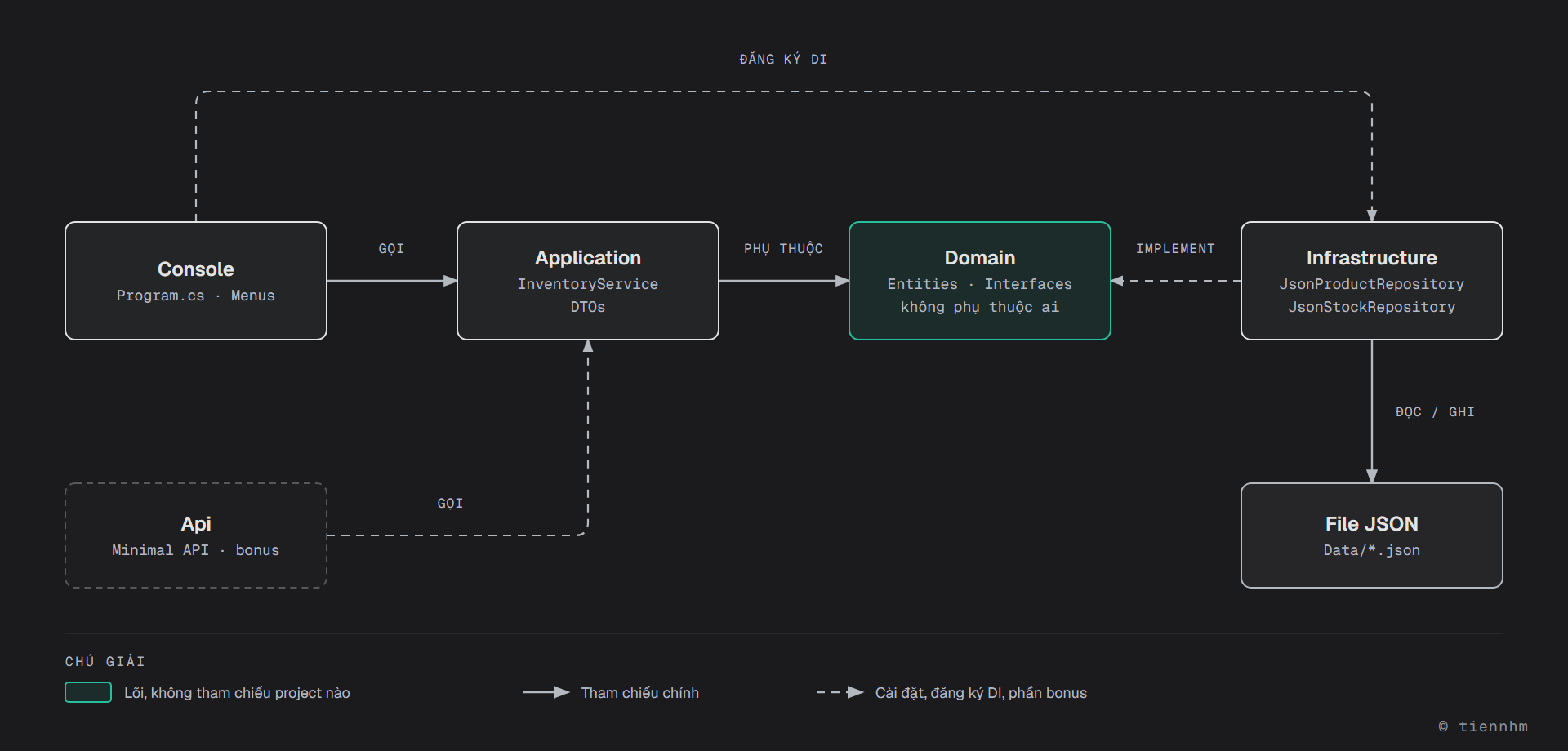
Chiều phụ thuộc
ConsoleApp ──► Application ──► Domain ◄── Infrastructure
     └──────────────────────────────────────┘
(chỉ để gọi AddInfrastructureServices khi đăng ký DI)- Domain không phụ thuộc ai: entity, quy tắc dữ liệu, interface repository.
- Application dùng interface của Domain, không biết dữ liệu nằm trong bộ nhớ hay file.
- Infrastructure implement interface của Domain.
- ConsoleApp chỉ gọi
IInventoryService. Nó tham chiếu Infrastructure duy nhất để đăng ký DI trongProgram.cs. Nơi ráp mọi thứ lại như vậy gọi là composition root.
5. Domain Models
Mỗi class nằm trong một file riêng, đường dẫn ghi ở dòng comment đầu khối code.
// src/InventorySystem.Domain/Entities/BaseEntity.cs
namespace InventorySystem.Domain.Entities;

public abstract class BaseEntity
{
    public Guid Id { get; init; } = Guid.NewGuid();
    public DateTime CreatedAt { get; init; } = DateTime.UtcNow;
    public DateTime? UpdatedAt { get; set; }
    public bool IsDeleted { get; set; }

    public void MarkAsUpdated() => UpdatedAt = DateTime.UtcNow;
}// src/InventorySystem.Domain/Entities/Category.cs
namespace InventorySystem.Domain.Entities;
public class Category : BaseEntity
{
public required string Name { get; set; }
public string? Description { get; set; }
}// src/InventorySystem.Domain/Entities/Product.cs
namespace InventorySystem.Domain.Entities;
public class Product : BaseEntity
{
public required string Name { get; set; }
/// <summary>Stock Keeping Unit: mã định danh duy nhất của sản phẩm</summary>
public required string Sku { get; set; }
public string? Description { get; set; }
/// <summary>Đơn vị tính: cái, hộp, kg, lít...</summary>
public required string Unit { get; set; }
/// <summary>Giá nhập</summary>
public decimal PurchasePrice { get; set; }
/// <summary>Tổng tồn nhỏ hơn hoặc bằng mức này thì cảnh báo</summary>
public int MinStockLevel { get; set; }
public Guid CategoryId { get; set; }
}// src/InventorySystem.Domain/Entities/Warehouse.cs
namespace InventorySystem.Domain.Entities;
public class Warehouse : BaseEntity
{
public required string Name { get; set; }
public string? Location { get; set; }
public bool IsActive { get; set; } = true;
}// src/InventorySystem.Domain/Entities/StockItem.cs
namespace InventorySystem.Domain.Entities;
/// <summary>
/// Số lượng tồn của một Product tại một Warehouse.
/// Mỗi cặp (ProductId, WarehouseId) chỉ có một StockItem.
/// </summary>
public class StockItem : BaseEntity
{
public Guid ProductId { get; set; }
public Guid WarehouseId { get; set; }
/// <summary>Số lượng hiện tại, không bao giờ âm</summary>
public int Quantity { get; set; }
}// src/InventorySystem.Domain/Entities/StockTransaction.cs
using InventorySystem.Domain.Enums;
namespace InventorySystem.Domain.Entities;
public class StockTransaction : BaseEntity
{
public Guid ProductId { get; set; }
public Guid WarehouseId { get; set; }
public TransactionType Type { get; set; }
/// <summary>Số lượng giao dịch, luôn dương; Type quyết định chiều tăng hay giảm</summary>
public int Quantity { get; set; }
/// <summary>Tồn kho trước giao dịch (để đối chiếu khi có sai lệch)</summary>
public int QuantityBefore { get; set; }
/// <summary>Tồn kho sau giao dịch</summary>
public int QuantityAfter { get; set; }
public string? Note { get; set; }
public required string CreatedBy { get; set; }
}// src/InventorySystem.Domain/Enums/TransactionType.cs
namespace InventorySystem.Domain.Enums;
public enum TransactionType
{
StockIn = 1, // Nhập kho
StockOut = 2, // Xuất kho
TransferOut = 3, // Chuyển đi, ghi ở kho nguồn
TransferIn = 4, // Chuyển đến, ghi ở kho đích
Adjustment = 5 // Điều chỉnh sau kiểm kê
}// src/InventorySystem.Domain/Exceptions/InventoryException.cs
namespace InventorySystem.Domain.Exceptions;
/// <summary>Lỗi nghiệp vụ. ErrorCode giúp UI (và sau này API) phân loại lỗi.</summary>
public class InventoryException : Exception
{
public string ErrorCode { get; }
public InventoryException(string errorCode, string message) : base(message)
{
ErrorCode = errorCode;
}
}
/// <summary>Dữ liệu đầu vào không hợp lệ: tên rỗng, SKU sai định dạng, số lượng không dương...</summary>
public class InventoryValidationException : InventoryException
{
public InventoryValidationException(string message) : base("VALIDATION", message)
{
}
}Ba quyết định thiết kế cần để ý:
StockItemkhông lưuTotalValue. Giá trị bằng số lượng nhân giá nhập, tính lúc cần. Lưu sẵn thì mỗi lần sửa giá phải nhớ cập nhật mọiStockItem, quên một chỗ là số liệu sai.- Chuyển kho ghi hai giao dịch,
TransferOutở kho nguồn vàTransferInở kho đích. Một loạiTransferchung không cho biết bản ghi nào trừ, bản ghi nào cộng. - Exception validation tên là
InventoryValidationExceptionvà kế thừaInventoryException. Đặt tênValidationExceptiondễ nhầm vớiSystem.ComponentModel.DataAnnotations.ValidationExceptioncó sẵn trong .NET. Kế thừa giúp menu chỉ cần mộtcatch (InventoryException)cho mọi lỗi nghiệp vụ.
6. Interfaces
Repository (Domain)
// src/InventorySystem.Domain/Interfaces/IRepository.cs
using InventorySystem.Domain.Entities;

namespace InventorySystem.Domain.Interfaces;

public interface IRepository<T> where T : BaseEntity
{
    Task<T?> GetByIdAsync(Guid id, CancellationToken ct = default);
    Task<IReadOnlyList<T>> GetAllAsync(CancellationToken ct = default);
    Task AddAsync(T entity, CancellationToken ct = default);
    Task UpdateAsync(T entity, CancellationToken ct = default);
    Task DeleteAsync(Guid id, CancellationToken ct = default);  // soft delete
}// src/InventorySystem.Domain/Interfaces/IProductRepository.cs
using InventorySystem.Domain.Entities;
namespace InventorySystem.Domain.Interfaces;
public interface IProductRepository : IRepository<Product>
{
Task<IReadOnlyList<Product>> GetByCategoryAsync(Guid categoryId, CancellationToken ct = default);
Task<IReadOnlyList<Product>> SearchAsync(string keyword, CancellationToken ct = default);
Task<bool> SkuExistsAsync(string sku, Guid? excludeId = null, CancellationToken ct = default);
}// src/InventorySystem.Domain/Interfaces/IStockRepository.cs
using InventorySystem.Domain.Entities;
namespace InventorySystem.Domain.Interfaces;
public interface IStockRepository
{
Task<StockItem?> GetStockAsync(Guid productId, Guid warehouseId, CancellationToken ct = default);
Task<IReadOnlyList<StockItem>> GetAllStockAsync(CancellationToken ct = default);
Task<IReadOnlyList<StockItem>> GetStockByProductAsync(Guid productId, CancellationToken ct = default);
Task UpsertStockAsync(StockItem stockItem, CancellationToken ct = default);
// Lịch sử giao dịch: chỉ thêm, không có method sửa hay xóa
Task AddTransactionAsync(StockTransaction transaction, CancellationToken ct = default);
Task<IReadOnlyList<StockTransaction>> GetTransactionsAsync(
Guid? productId = null,
Guid? warehouseId = null,
DateTime? from = null,
DateTime? to = null,
CancellationToken ct = default);
}Category và Warehouse không cần method riêng, nên dùng thẳng IRepository<Category> và IRepository<Warehouse>.
DTO và request (Application)
DTO (Data Transfer Object) là object chỉ chở dữ liệu ra vào service. Dùng record vì gọn và không cần sửa sau khi tạo (bài 4.7).
// src/InventorySystem.Application/DTOs/Requests.cs
namespace InventorySystem.Application.DTOs;

public record CreateCategoryRequest(string Name, string? Description = null);
public record CreateWarehouseRequest(string Name, string? Location = null);

public record CreateProductRequest(
    string Name, string Sku, string Unit, decimal PurchasePrice, Guid CategoryId, int MinStockLevel = 0);

public record UpdateProductRequest(
    string Name, string Sku, decimal PurchasePrice, Guid CategoryId, int MinStockLevel);

public record StockInRequest(Guid ProductId, Guid WarehouseId, int Quantity, string? Note = null);
public record StockOutRequest(Guid ProductId, Guid WarehouseId, int Quantity, string? Note = null);
public record TransferRequest(Guid ProductId, Guid FromWarehouseId, Guid ToWarehouseId, int Quantity);// src/InventorySystem.Application/DTOs/Dtos.cs
using InventorySystem.Domain.Enums;
namespace InventorySystem.Application.DTOs;
public record CategoryDto(Guid Id, string Name);
public record WarehouseDto(Guid Id, string Name, string? Location);
public record ProductDto(Guid Id, string Name, string Sku, string Unit, decimal PurchasePrice, Guid CategoryId, int MinStockLevel);
public record StockItemDto(Guid ProductId, string ProductName, Guid WarehouseId, string WarehouseName, int Quantity, decimal TotalValue);
public record LowStockAlertDto(Guid ProductId, string ProductName, int TotalQuantity, int MinStockLevel);
public record TransactionDto(Guid Id, Guid ProductId, Guid WarehouseId, TransactionType Type, int Quantity,
int QuantityBefore, int QuantityAfter, DateTime CreatedAt, string CreatedBy, string? Note);IInventoryService (Application)
// src/InventorySystem.Application/Abstractions/IInventoryService.cs
using InventorySystem.Application.DTOs;

namespace InventorySystem.Application.Abstractions;

public interface IInventoryService
{
    // Category và Warehouse
    Task<CategoryDto> CreateCategoryAsync(CreateCategoryRequest request, CancellationToken ct = default);
    Task<IReadOnlyList<CategoryDto>> GetCategoriesAsync(CancellationToken ct = default);
    Task DeleteCategoryAsync(Guid id, CancellationToken ct = default);
    Task<WarehouseDto> CreateWarehouseAsync(CreateWarehouseRequest request, CancellationToken ct = default);
    Task<IReadOnlyList<WarehouseDto>> GetWarehousesAsync(CancellationToken ct = default);

    // Product
    Task<ProductDto> CreateProductAsync(CreateProductRequest request, CancellationToken ct = default);
    Task<ProductDto> UpdateProductAsync(Guid id, UpdateProductRequest request, CancellationToken ct = default);
    Task DeleteProductAsync(Guid id, CancellationToken ct = default);
    Task<IReadOnlyList<ProductDto>> GetProductsAsync(string? keyword = null, Guid? categoryId = null, CancellationToken ct = default);

    // Stock
    Task<StockItemDto> StockInAsync(StockInRequest request, CancellationToken ct = default);
    Task<StockItemDto> StockOutAsync(StockOutRequest request, CancellationToken ct = default);
    Task TransferStockAsync(TransferRequest request, CancellationToken ct = default);
    Task<IReadOnlyList<StockItemDto>> GetCurrentStockAsync(Guid? warehouseId = null, CancellationToken ct = default);

    // Report
    Task<IReadOnlyList<LowStockAlertDto>> GetLowStockAlertsAsync(CancellationToken ct = default);
    Task<IReadOnlyList<TransactionDto>> GetTransactionHistoryAsync(
        Guid? productId = null, DateTime? from = null, DateTime? to = null, CancellationToken ct = default);
}
7. Hướng dẫn từng bước
Bước 1 — Tạo solution và đăng ký DI
Các lệnh dưới đây chạy được cả trên PowerShell lẫn bash. Mỗi project được liệt kê rõ đường dẫn, vì PowerShell không tự mở rộng mẫu src/**/*.csproj như bash.
mkdir InventorySystem
cd InventorySystem
dotnet new sln -n InventorySystem
dotnet new gitignore
dotnet new classlib -n InventorySystem.Domain -o src/InventorySystem.Domain
dotnet new classlib -n InventorySystem.Application -o src/InventorySystem.Application
dotnet new classlib -n InventorySystem.Infrastructure -o src/InventorySystem.Infrastructure
dotnet new console -n InventorySystem.ConsoleApp -o src/InventorySystem.ConsoleApp
dotnet new xunit -n InventorySystem.Tests -o tests/InventorySystem.Tests

dotnet sln add src/InventorySystem.Domain src/InventorySystem.Application src/InventorySystem.Infrastructure src/InventorySystem.ConsoleApp tests/InventorySystem.Tests

# Tham chiếu giữa các project, đúng chiều ở mục 4
dotnet add src/InventorySystem.Application reference src/InventorySystem.Domain
dotnet add src/InventorySystem.Infrastructure reference src/InventorySystem.Domain
dotnet add src/InventorySystem.ConsoleApp reference src/InventorySystem.Application src/InventorySystem.Infrastructure
dotnet add tests/InventorySystem.Tests reference src/InventorySystem.Application src/InventorySystem.Infrastructure

# Gói NuGet
dotnet add src/InventorySystem.Application package Microsoft.Extensions.DependencyInjection.Abstractions
dotnet add src/InventorySystem.Infrastructure package Microsoft.Extensions.DependencyInjection.Abstractions
dotnet add src/InventorySystem.ConsoleApp package Microsoft.Extensions.Hosting
Xóa các file mẫu Class1.cs và UnitTest1.cs mà template tạo ra. System.Text.Json đã có sẵn trong .NET 10, không cần cài thêm. Hai project thư viện chỉ cần gói ...DependencyInjection.Abstractions (chứa IServiceCollection) để viết extension method đăng ký service. Project console cần Microsoft.Extensions.Hosting, gói này kéo theo container DI và cấu hình.
Mỗi tầng tự đăng ký service của mình qua một extension method (bài 5.5):
// src/InventorySystem.Application/DependencyInjection.cs
using InventorySystem.Application.Abstractions;
using InventorySystem.Application.Services;
using Microsoft.Extensions.DependencyInjection;

namespace InventorySystem.Application;

public static class DependencyInjection
{
    public static IServiceCollection AddApplicationServices(this IServiceCollection services)
    {
        // Scoped: mỗi scope (một phiên console, sau này một HTTP request) có một InventoryService
        services.AddScoped<IInventoryService, InventoryService>();
        return services;
    }
}// src/InventorySystem.Infrastructure/DependencyInjection.cs
using InventorySystem.Domain.Entities;
using InventorySystem.Domain.Interfaces;
using InventorySystem.Infrastructure.Persistence;
using Microsoft.Extensions.DependencyInjection;
namespace InventorySystem.Infrastructure;
public static class DependencyInjection
{
public static IServiceCollection AddInfrastructureServices(this IServiceCollection services, string dataDirectory)
{
// Singleton có chủ đích: mỗi repository giữ dữ liệu trong bộ nhớ và là nơi duy nhất ghi file JSON.
// Constructor nhận string nên container không tự tạo được, phải đăng ký bằng factory (lambda).
services.AddSingleton<IProductRepository>(_ => new JsonProductRepository(dataDirectory));
services.AddSingleton<IStockRepository>(_ => new JsonStockRepository(dataDirectory));
services.AddSingleton<IRepository<Category>>(_ => new JsonRepository<Category>(dataDirectory, "categories.json"));
services.AddSingleton<IRepository<Warehouse>>(_ => new JsonRepository<Warehouse>(dataDirectory, "warehouses.json"));
return services;
}
// Dùng khi mới làm Bước 2 option A, chưa có repository JSON
public static IServiceCollection AddInMemoryInfrastructure(this IServiceCollection services)
{
services.AddSingleton<IProductRepository, InMemoryProductRepository>();
services.AddSingleton<IStockRepository, InMemoryStockRepository>();
services.AddSingleton<IRepository<Category>, InMemoryRepository<Category>>();
services.AddSingleton<IRepository<Warehouse>, InMemoryRepository<Warehouse>>();
return services;
}
}Vì sao repository là Singleton còn service là Scoped? Repository giữ dữ liệu: nếu là Scoped hay Transient, mỗi lần tạo mới lại có một kho rỗng (in-memory) hoặc nhiều object cùng ghi đè một file (JSON). Service không giữ dữ liệu, nên Scoped là đủ và giống cách nó sẽ chạy trong ASP.NET Core. Service Scoped được phép phụ thuộc repository Singleton; chiều ngược lại mới là lỗi captive dependency (bài 7.4).
Program.cs là composition root:
// src/InventorySystem.ConsoleApp/Program.cs
using InventorySystem.Application;
using InventorySystem.ConsoleApp.Menus;
using InventorySystem.Infrastructure;
using Microsoft.Extensions.DependencyInjection;
using Microsoft.Extensions.Hosting;

Console.OutputEncoding = System.Text.Encoding.UTF8;   // in được tiếng Việt trên Windows

var builder = Host.CreateApplicationBuilder(args);

// Kiểm tra cấu hình DI ngay khi Build(), ở mọi môi trường (xem bài 7.11)
builder.ConfigureContainer(new DefaultServiceProviderFactory(new ServiceProviderOptions
{
    ValidateScopes = true,
    ValidateOnBuild = true
}));

var dataDirectory = Path.Combine(AppContext.BaseDirectory, "data");
builder.Services.AddApplicationServices();
builder.Services.AddInfrastructureServices(dataDirectory);   // hoặc AddInMemoryInfrastructure()
builder.Services.AddScoped<MainMenu>();

using var host = builder.Build();

// Ctrl+C: hủy token thay vì tắt ngang chương trình (Bước 5)
using var cts = new CancellationTokenSource();
Console.CancelKeyPress += (_, e) =>
{
    e.Cancel = true;
    cts.Cancel();
    Console.WriteLine("\nĐang tắt...");
};

// Cả phiên làm việc là một scope, giống một request trong Web API
using (var scope = host.Services.CreateScope())
{
    var menu = scope.ServiceProvider.GetRequiredService<MainMenu>();
    await menu.RunAsync(cts.Token);
}

Console.WriteLine("Tạm biệt!");
IInventoryService là Scoped nên phải lấy qua scope.ServiceProvider. Lấy thẳng từ host.Services (root provider) với ValidateScopes = true sẽ báo lỗi ngay:
Unhandled exception. System.InvalidOperationException: Cannot resolve scoped service 'InventorySystem.Application.Abstractions.IInventoryService' from root provider.AppContext.BaseDirectory là thư mục chứa file .dll đang chạy. Với dotnet run, dữ liệu nằm ở src/InventorySystem.ConsoleApp/bin/Debug/net10.0/data/, thư mục bin/ đã nằm trong .gitignore nên dữ liệu thử không bị commit.
Bước 2 — Repository
Bắt đầu với in-memory để có cái chạy sớm và để viết test. Sau đó mới làm JSON.
Option A: In-memory (Dictionary)
// src/InventorySystem.Infrastructure/Persistence/InMemoryRepository.cs
using InventorySystem.Domain.Entities;
using InventorySystem.Domain.Interfaces;

namespace InventorySystem.Infrastructure.Persistence;

public class InMemoryRepository<T> : IRepository<T> where T : BaseEntity
{
    protected readonly Dictionary<Guid, T> Store = new();

    public Task<T?> GetByIdAsync(Guid id, CancellationToken ct = default)
    {
        Store.TryGetValue(id, out var entity);
        // Chỉ trả về nếu chưa bị soft delete
        return Task.FromResult(entity is { IsDeleted: false } ? entity : null);
    }

    public Task<IReadOnlyList<T>> GetAllAsync(CancellationToken ct = default) =>
        Task.FromResult<IReadOnlyList<T>>(Store.Values.Where(e => !e.IsDeleted).ToList());

    public Task AddAsync(T entity, CancellationToken ct = default)
    {
        Store.Add(entity.Id, entity);
        return Task.CompletedTask;
    }

    // TODO: UpdateAsync (gán lại Store[entity.Id]), DeleteAsync (IsDeleted = true, MarkAsUpdated)
}

public class InMemoryProductRepository : InMemoryRepository<Product>, IProductRepository
{
    public Task<bool> SkuExistsAsync(string sku, Guid? excludeId = null, CancellationToken ct = default) =>
        Task.FromResult(Store.Values.Any(p => !p.IsDeleted && p.Sku == sku && p.Id != excludeId));

    // TODO: GetByCategoryAsync, SearchAsync (Contains với StringComparison.OrdinalIgnoreCase trên Name và Sku)
}

// TODO: InMemoryStockRepository : IStockRepository, dùng List<StockItem> và List<StockTransaction>
Các method trả về Task.FromResult(...) vì dữ liệu đã nằm sẵn trong bộ nhớ, không có I/O nào để chờ. Interface vẫn là async để sau này đổi sang JSON hay database không phải sửa service.
Option B: Lưu file JSON
Cách đơn giản nhất: đọc cả file vào List<T> khi tạo repository, mỗi lần thêm, sửa, xóa thì ghi lại cả file. Phần đọc ghi file tách thành class riêng để các repository dùng chung:
// src/InventorySystem.Infrastructure/Persistence/JsonFile.cs
using System.Text.Json;

namespace InventorySystem.Infrastructure.Persistence;

public class JsonFile<T>
{
    private static readonly JsonSerializerOptions Options = new() { WriteIndented = true };
    private readonly string _filePath;

    public JsonFile(string dataDirectory, string fileName)
    {
        Directory.CreateDirectory(dataDirectory);
        _filePath = Path.Combine(dataDirectory, fileName);
    }

    // Đọc đồng bộ vì chỉ chạy một lần, trong constructor (constructor không thể async)
    public List<T> Load() =>
        File.Exists(_filePath)
            ? JsonSerializer.Deserialize<List<T>>(File.ReadAllText(_filePath), Options) ?? []
            : [];

    public async Task SaveAsync(List<T> items, CancellationToken ct)
    {
        // Ghi ra file tạm rồi đổi tên: nếu app dừng giữa chừng, file cũ vẫn nguyên vẹn
        var tempPath = _filePath + ".tmp";
        await using (var stream = File.Create(tempPath))
        {
            await JsonSerializer.SerializeAsync(stream, items, Options, ct);
        }
        File.Move(tempPath, _filePath, overwrite: true);
    }
}// src/InventorySystem.Infrastructure/Persistence/JsonRepository.cs (phần đầu)
public class JsonRepository<T> : IRepository<T> where T : BaseEntity
{
private readonly JsonFile<T> _file;
protected readonly List<T> Items;
public JsonRepository(string dataDirectory, string fileName)
{
_file = new JsonFile<T>(dataDirectory, fileName);
Items = _file.Load();
}
protected Task SaveAsync(CancellationToken ct) => _file.SaveAsync(Items, ct);
public Task AddAsync(T entity, CancellationToken ct = default)
{
Items.Add(entity);
return SaveAsync(ct);
}
// TODO: các method còn lại, luôn gọi SaveAsync sau khi Add/Update/Delete
}
public class JsonProductRepository : JsonRepository<Product>, IProductRepository
{
public JsonProductRepository(string dataDirectory) : base(dataDirectory, "products.json")
{
}
// TODO: GetByCategoryAsync, SearchAsync, SkuExistsAsync giống bản in-memory, nhưng trên Items
}
// TODO: JsonStockRepository giữ hai JsonFile: stock.json và transactions.jsonConstructor của JsonProductRepository nhận string dataDirectory. Container DI không biết lấy string ở đâu, nên nếu đăng ký kiểu AddSingleton<IProductRepository, JsonProductRepository>() thì ValidateOnBuild báo lỗi lúc khởi động:
Unable to resolve service for type 'System.String' while attempting to activate 'InventorySystem.Infrastructure.Persistence.JsonProductRepository'.Vì vậy AddInfrastructureServices ở Bước 1 dùng factory _ => new JsonProductRepository(dataDirectory). Cách khác là gom cấu hình vào class StorageOptions và nhận IOptions<StorageOptions> (bài 7.7).
Bước 3 — InventoryService và quy tắc nghiệp vụ
InventoryService là trái tim của ứng dụng. Nó nhận các repository qua constructor:
// src/InventorySystem.Application/Services/InventoryService.cs
using InventorySystem.Application.Abstractions;
using InventorySystem.Application.DTOs;
using InventorySystem.Domain.Entities;
using InventorySystem.Domain.Enums;
using InventorySystem.Domain.Exceptions;
using InventorySystem.Domain.Interfaces;

namespace InventorySystem.Application.Services;

public class InventoryService : IInventoryService
{
    private static readonly string CurrentUser = Environment.UserName;

    private readonly IProductRepository _productRepo;
    private readonly IStockRepository _stockRepo;
    private readonly IRepository<Category> _categoryRepo;
    private readonly IRepository<Warehouse> _warehouseRepo;

    public InventoryService(
        IProductRepository productRepo,
        IStockRepository stockRepo,
        IRepository<Category> categoryRepo,
        IRepository<Warehouse> warehouseRepo)
    {
        _productRepo = productRepo;
        _stockRepo = stockRepo;
        _categoryRepo = categoryRepo;
        _warehouseRepo = warehouseRepo;
    }

    public async Task<StockItemDto> StockOutAsync(StockOutRequest request, CancellationToken ct = default)
    {
        // TODO, theo thứ tự:
        // 1. Số lượng phải > 0, nếu không ném InventoryValidationException
        // 2. Product và Warehouse phải tồn tại, nếu không ném InventoryException("NOT_FOUND", ...)
        // 3. Lấy StockItem hiện tại (GetStockAsync); null nghĩa là tồn bằng 0
        // 4. Tồn < số lượng xuất: ném InventoryException("INSUFFICIENT_STOCK", ...)
        // 5. Trừ tồn, UpsertStockAsync
        // 6. Ghi StockTransaction (Type = StockOut, QuantityBefore, QuantityAfter, CreatedBy = CurrentUser)
        // 7. Trả về StockItemDto
        throw new NotImplementedException();
    }

    // Các method khác theo cùng khuôn: kiểm tra, đọc, áp quy tắc, ghi, ghi log, trả DTO
}
Lời giải tham khảo — StockOutAsync và các hàm phụ
public async Task<StockItemDto> StockOutAsync(StockOutRequest request, CancellationToken ct = default)
{
    RequirePositive(request.Quantity);
    var product = await GetProductOrThrowAsync(request.ProductId, ct);
    var warehouse = await GetWarehouseOrThrowAsync(request.WarehouseId, ct);

    var stock = await _stockRepo.GetStockAsync(product.Id, warehouse.Id, ct);
    var before = stock?.Quantity ?? 0;

    if (stock is null || before < request.Quantity)
        throw new InventoryException("INSUFFICIENT_STOCK",
            $"Sản phẩm {product.Name} chỉ còn {before} {product.Unit} ở {warehouse.Name}.");

    stock.Quantity = before - request.Quantity;
    stock.MarkAsUpdated();
    await _stockRepo.UpsertStockAsync(stock, ct);
    await LogAsync(product.Id, warehouse.Id, TransactionType.StockOut, request.Quantity, before, stock.Quantity, request.Note, ct);

    return ToDto(stock, product, warehouse);
}

private static void RequirePositive(int quantity)
{
    if (quantity <= 0)
        throw new InventoryValidationException("Số lượng phải lớn hơn 0.");
}

private async Task<Product> GetProductOrThrowAsync(Guid id, CancellationToken ct) =>
    await _productRepo.GetByIdAsync(id, ct)
    ?? throw new InventoryException("NOT_FOUND", "Không tìm thấy sản phẩm.");

private async Task<Warehouse> GetWarehouseOrThrowAsync(Guid id, CancellationToken ct) =>
    await _warehouseRepo.GetByIdAsync(id, ct)
    ?? throw new InventoryException("NOT_FOUND", "Không tìm thấy kho.");

private Task LogAsync(Guid productId, Guid warehouseId, TransactionType type, int quantity,
    int before, int after, string? note, CancellationToken ct) =>
    _stockRepo.AddTransactionAsync(new StockTransaction
    {
        ProductId = productId, WarehouseId = warehouseId, Type = type, Quantity = quantity,
        QuantityBefore = before, QuantityAfter = after, Note = note, CreatedBy = CurrentUser
    }, ct);

private static StockItemDto ToDto(StockItem s, Product p, Warehouse w) =>
    new(p.Id, p.Name, w.Id, w.Name, s.Quantity, s.Quantity * p.PurchasePrice);
StockInAsync gần giống: nếu GetStockAsync trả null thì tạo new StockItem { ProductId = ..., WarehouseId = ... } rồi cộng số lượng.
Lời giải tham khảo — TransferStockAsync
Ý chính: kiểm tra mọi điều kiện trước khi ghi gì. Nếu ghi kho nguồn xong mà ghi kho đích lỗi, hoàn tác bằng tay vì repository JSON và in-memory không có transaction như database.
public async Task TransferStockAsync(TransferRequest request, CancellationToken ct = default)
{
    RequirePositive(request.Quantity);
    if (request.FromWarehouseId == request.ToWarehouseId)
        throw new InventoryValidationException("Kho nguồn và kho đích phải khác nhau.");
    var product = await GetProductOrThrowAsync(request.ProductId, ct);
    var from = await GetWarehouseOrThrowAsync(request.FromWarehouseId, ct);
    var to = await GetWarehouseOrThrowAsync(request.ToWarehouseId, ct);

    var source = await _stockRepo.GetStockAsync(product.Id, from.Id, ct);
    var sourceBefore = source?.Quantity ?? 0;
    if (source is null || sourceBefore < request.Quantity)
        throw new InventoryException("INSUFFICIENT_STOCK",
            $"{from.Name} chỉ còn {sourceBefore} {product.Unit} {product.Name}.");
    var dest = await _stockRepo.GetStockAsync(product.Id, to.Id, ct)
               ?? new StockItem { ProductId = product.Id, WarehouseId = to.Id };
    var destBefore = dest.Quantity;

    source.Quantity -= request.Quantity;
    dest.Quantity += request.Quantity;
    try
    {
        await _stockRepo.UpsertStockAsync(source, ct);
        await _stockRepo.UpsertStockAsync(dest, ct);
    }
    catch
    {
        source.Quantity = sourceBefore;
        dest.Quantity = destBefore;
        await _stockRepo.UpsertStockAsync(source, CancellationToken.None);
        await _stockRepo.UpsertStockAsync(dest, CancellationToken.None);
        throw;
    }

    var note = $"Chuyển {from.Name} -> {to.Name}";
    await LogAsync(product.Id, from.Id, TransactionType.TransferOut, request.Quantity, sourceBefore, source.Quantity, note, ct);
    await LogAsync(product.Id, to.Id, TransactionType.TransferIn, request.Quantity, destBefore, dest.Quantity, note, ct);
}
Lúc hoàn tác dùng CancellationToken.None: nếu lỗi xảy ra do người dùng vừa hủy token, việc hoàn tác vẫn phải chạy xong.
Bước 4 — Menu console
Menu chỉ làm ba việc: đọc input, gọi service, in kết quả. Không có quy tắc nghiệp vụ nào ở đây.
// src/InventorySystem.ConsoleApp/Menus/MainMenu.cs
using InventorySystem.Application.Abstractions;
using InventorySystem.Application.DTOs;
using InventorySystem.Domain.Exceptions;

namespace InventorySystem.ConsoleApp.Menus;

public class MainMenu
{
    private readonly IInventoryService _service;

    public MainMenu(IInventoryService service) => _service = service;

    public async Task RunAsync(CancellationToken ct = default)
    {
        while (!ct.IsCancellationRequested)
        {
            Console.WriteLine();
            Console.WriteLine("=== INVENTORY MANAGEMENT SYSTEM ===");
            Console.WriteLine("1. Thêm danh mục");
            Console.WriteLine("2. Thêm kho");
            Console.WriteLine("3. Thêm sản phẩm");
            Console.WriteLine("4. Nhập kho");
            Console.WriteLine("5. Xuất kho");
            Console.WriteLine("6. Xem tồn kho");
            Console.WriteLine("0. Thoát");
            Console.Write("Chọn: ");

            var choice = Console.ReadLine();
            // null: hết input (Ctrl+Z trên Windows, Ctrl+D trên Linux/macOS)
            if (choice is null || choice == "0" || ct.IsCancellationRequested)
                break;

            try
            {
                var handled = await HandleChoiceAsync(choice, ct);
                if (!handled)
                    Console.WriteLine("Lựa chọn không hợp lệ.");
            }
            catch (InventoryException ex)
            {
                // Lỗi nghiệp vụ: báo cho người dùng rồi quay lại menu, không làm sập app
                Console.WriteLine($"[{ex.ErrorCode}] {ex.Message}");
            }
            catch (OperationCanceledException)
            {
                break;
            }
        }
    }

    // Trả về false nếu lựa chọn không có trong menu
    private async Task<bool> HandleChoiceAsync(string choice, CancellationToken ct)
    {
        switch (choice)
        {
            case "5": await StockOutAsync(ct); return true;
            // TODO: case "1" tới "6"
            default: return false;
        }
    }

    private async Task StockOutAsync(CancellationToken ct)
    {
        var product = ConsoleHelper.Choose("Chọn sản phẩm", await _service.GetProductsAsync(ct: ct), p => $"{p.Name} ({p.Sku})");
        var warehouse = ConsoleHelper.Choose("Chọn kho", await _service.GetWarehousesAsync(ct), w => w.Name);
        var quantity = ConsoleHelper.ReadInt("Số lượng xuất: ");
        var stock = await _service.StockOutAsync(new StockOutRequest(product.Id, warehouse.Id, quantity), ct);
        Console.WriteLine($"Đã xuất. {stock.ProductName} tại {stock.WarehouseName} còn: {stock.Quantity}");
    }
}
Chọn 0 thì break khỏi vòng lặp, RunAsync kết thúc, Program.cs in "Tạm biệt!". Lựa chọn sai chỉ in một dòng, không cần Task.Run hay Task nào. Code không gọi Console.Clear() để thông báo lỗi không bị xóa mất trước khi bạn kịp đọc.
ConsoleHelper gom các hàm nhập liệu dùng lại nhiều lần. Người dùng chọn sản phẩm theo số thứ tự thay vì gõ Guid:
// src/InventorySystem.ConsoleApp/ConsoleHelper.cs
using InventorySystem.Domain.Exceptions;

namespace InventorySystem.ConsoleApp;

public static class ConsoleHelper
{
    public static string ReadText(string prompt)
    {
        Console.Write(prompt);
        // Hết input giữa chừng thì coi như người dùng muốn dừng
        return Console.ReadLine() ?? throw new OperationCanceledException();
    }

    public static int ReadInt(string prompt)
    {
        while (true)
        {
            if (int.TryParse(ReadText(prompt), out var value)) return value;
            Console.WriteLine("Hãy nhập một số nguyên.");
        }
    }

    public static T Choose<T>(string title, IReadOnlyList<T> items, Func<T, string> label)
    {
        if (items.Count == 0)
            throw new InventoryException("EMPTY", $"{title}: danh sách đang trống.");
        Console.WriteLine($"{title}:");
        for (var i = 0; i < items.Count; i++)
            Console.WriteLine($"  {i + 1}. {label(items[i])}");
        while (true)
        {
            var index = ReadInt("Số thứ tự: ");
            if (index >= 1 && index <= items.Count) return items[index - 1];
            Console.WriteLine("Không có lựa chọn này.");
        }
    }

    // TODO: ReadDecimal cho giá nhập
}
Một lượt chạy thật của bản hoàn chỉnh (đã lược bớt các dòng menu lặp lại):
Chọn: 5
Chọn sản phẩm:
  1. Laptop Dell (LAPTOP-001)
Số thứ tự: 1
Chọn kho:
  1. Kho A
Số thứ tự: 1
Số lượng xuất: 40
[INSUFFICIENT_STOCK] Sản phẩm Laptop Dell chỉ còn 30 cái ở Kho A.
Chọn: 9
Lựa chọn không hợp lệ.
Chọn: 0
Tạm biệt!
Bước 5 — Ctrl+C và CancellationToken
Đoạn Console.CancelKeyPress trong Program.cs ở Bước 1 biến Ctrl+C thành cts.Cancel(). e.Cancel = true báo cho .NET đừng tắt process ngay, để app tự dừng sau khi xong việc đang dở. Token cts.Token đi vào MainMenu.RunAsync, rồi vào từng method của service, rồi xuống repository, tới JsonSerializer.SerializeAsync.
Quy tắc: mọi method async nhận CancellationToken ct = default và truyền nó cho mọi lời gọi async bên trong (bài 6.4). Không bọc I/O trong Task.Run: đọc ghi file đã có API async thật.
Một giới hạn cần biết: Console.ReadLine() không nhận CancellationToken. Nhấn Ctrl+C khi app đang chờ nhập thì token bị hủy ngay, nhưng vòng lặp chỉ thấy điều đó khi ReadLine trả về. Vì vậy RunAsync kiểm tra ct.IsCancellationRequested ngay sau ReadLine và thoát, không xử lý lựa chọn vừa nhập. Dữ liệu không mất vì mỗi thay đổi đã được ghi file ngay lúc nó xảy ra.
Bước 6 — Unit test
Test gọi thẳng InventoryService với repository in-memory, không cần menu hay file. Đây là lợi ích trực tiếp của việc tách tầng: quy tắc nghiệp vụ kiểm chứng được trong vài trăm mili giây.
// tests/InventorySystem.Tests/InventoryServiceTests.cs
using InventorySystem.Application.DTOs;
using InventorySystem.Application.Services;
using InventorySystem.Domain.Entities;
using InventorySystem.Domain.Enums;
using InventorySystem.Domain.Exceptions;
using InventorySystem.Infrastructure.Persistence;

namespace InventorySystem.Tests;

public class InventoryServiceTests
{
    // xUnit tạo object mới của class này cho mỗi test, nên dữ liệu không dính sang test khác
    private readonly InventoryService _service = new(
        new InMemoryProductRepository(),
        new InMemoryStockRepository(),
        new InMemoryRepository<Category>(),
        new InMemoryRepository<Warehouse>());

    private async Task<(ProductDto Laptop, WarehouseDto KhoA)> SeedAsync(int stockIn = 50)
    {
        var category = await _service.CreateCategoryAsync(new CreateCategoryRequest("Điện tử"));
        var laptop = await _service.CreateProductAsync(
            new CreateProductRequest("Laptop Dell", "LAPTOP-001", "cái", 15_000_000m, category.Id));
        var khoA = await _service.CreateWarehouseAsync(new CreateWarehouseRequest("Kho A"));
        if (stockIn > 0)
            await _service.StockInAsync(new StockInRequest(laptop.Id, khoA.Id, stockIn));
        return (laptop, khoA);
    }

    [Fact] // TC-03
    public async Task StockOut_EnoughStock_QuantityDecreases()
    {
        var (laptop, khoA) = await SeedAsync(stockIn: 50);

        var result = await _service.StockOutAsync(new StockOutRequest(laptop.Id, khoA.Id, 20));

        Assert.Equal(30, result.Quantity);
    }

    [Fact] // TC-06
    public async Task StockOut_MoreThanAvailable_ThrowsAndKeepsStock()
    {
        var (laptop, khoA) = await SeedAsync(stockIn: 30);

        var ex = await Assert.ThrowsAsync<InventoryException>(() =>
            _service.StockOutAsync(new StockOutRequest(laptop.Id, khoA.Id, 40)));

        Assert.Equal("INSUFFICIENT_STOCK", ex.ErrorCode);
        Assert.Equal(30, (await _service.GetCurrentStockAsync(khoA.Id)).Single().Quantity);
    }

    [Theory] // TC-08
    [InlineData("")]
    [InlineData("   ")]
    public async Task CreateProduct_BlankName_ThrowsValidation(string name)
    {
        var category = await _service.CreateCategoryAsync(new CreateCategoryRequest("Điện tử"));

        await Assert.ThrowsAsync<InventoryValidationException>(() => _service.CreateProductAsync(
            new CreateProductRequest(name, "SKU-001", "cái", 1m, category.Id)));
    }

    [Fact] // TC-11
    public async Task Transfer_MovesStockAndLogsTwoTransactions()
    {
        var (laptop, khoA) = await SeedAsync(stockIn: 30);
        var khoB = await _service.CreateWarehouseAsync(new CreateWarehouseRequest("Kho B"));

        await _service.TransferStockAsync(new TransferRequest(laptop.Id, khoA.Id, khoB.Id, 10));

        Assert.Equal(20, (await _service.GetCurrentStockAsync(khoA.Id)).Single().Quantity);
        Assert.Equal(10, (await _service.GetCurrentStockAsync(khoB.Id)).Single().Quantity);
        var history = await _service.GetTransactionHistoryAsync(laptop.Id);
        Assert.Equal(
            [TransactionType.StockIn, TransactionType.TransferOut, TransactionType.TransferIn],
            history.Select(t => t.Type));
    }

    // TODO: TC-02, TC-07, TC-09, TC-10 theo cùng khuôn
}
Assert.ThrowsAsync<T> chỉ đạt khi exception có đúng kiểu T. Vì vậy TC-08 dùng InventoryValidationException, còn TC-06 dùng InventoryException.
Chạy ở thư mục chứa file .slnx. Kết quả với bộ test đầy đủ của lời giải tham khảo (7 [Fact] và 1 [Theory] hai bộ dữ liệu, tính là 9 test):
Passed! - Failed: 0, Passed: 9, Skipped: 0, Total: 9, Duration: 287 ms - InventorySystem.Tests.dll (net10.0)8. Quy tắc nghiệp vụ
Mọi quy tắc dưới đây nằm trong InventoryService, không nằm ở menu. Có như vậy thì menu console, Web API ở Level 3 và unit test đều được bảo vệ như nhau.
Tồn kho
- Tồn không âm: xuất kho kiểm tra
tồn hiện tại >= số lượng xuất. Thiếu thì némInventoryException("INSUFFICIENT_STOCK", "Sản phẩm Laptop Dell chỉ còn 30 cái ở Kho A."). - Số lượng phải dương khi nhập, xuất, chuyển. Sai thì ném
InventoryValidationException. - Chuyển kho trọn vẹn: kho nguồn và kho đích phải khác nhau. Kiểm tra đủ điều kiện trước khi ghi. Ghi lỗi giữa chừng thì hoàn tác cả hai phía. Ghi hai giao dịch
TransferOutvàTransferIn.
Sản phẩm
- Tên: cắt khoảng trắng đầu cuối (
Trim), không rỗng, tối đa 200 ký tự. - SKU duy nhất: khi tạo gọi
SkuExistsAsync(sku); khi sửa gọiSkuExistsAsync(sku, excludeId: id)để không tự trùng với chính nó. Trùng thì némInventoryException("DUPLICATE_SKU", ...). - Định dạng SKU: chỉ chữ hoa, số, dấu gạch ngang, dài 3 tới 20 ký tự. Regex
^[A-Z0-9-]{3,20}$. - Giá nhập ≥ 0 (cho phép hàng mẫu giá 0).
- Không xóa sản phẩm còn hàng: tổng tồn ở mọi kho > 0 thì ném
InventoryException("HAS_STOCK", ...).
Danh mục
- Không xóa danh mục đang dùng: còn sản phẩm (chưa xóa) thuộc danh mục thì ném
InventoryException("CATEGORY_IN_USE", ...).
9. Test case
TC-01 tới TC-11 kiểm bằng unit test (Bước 6), TC-01 tới TC-05 còn phải demo được qua menu. TC-12 kiểm bằng tay.
Luồng chính
| # | Kịch bản | Kết quả mong đợi |
|---|---|---|
| TC-01 | Tạo danh mục "Điện tử", tạo sản phẩm "Laptop Dell" SKU "LAPTOP-001" | Sản phẩm được lưu, SKU đúng |
| TC-02 | Nhập 50 "Laptop Dell" vào "Kho A" | Tồn = 50, có 1 giao dịch StockIn |
| TC-03 | Xuất 20 "Laptop Dell" từ "Kho A" | Tồn = 30, có giao dịch StockOut |
| TC-04 | Xem lịch sử của "Laptop Dell" | 2 giao dịch theo thứ tự: StockIn 50, StockOut 20 |
| TC-05 | Xem tồn kho | "Laptop Dell", Kho A, 30 |
Trường hợp biên
| # | Kịch bản | Kết quả mong đợi |
|---|---|---|
| TC-06 | Xuất 40 khi chỉ còn 30 | InventoryException mã INSUFFICIENT_STOCK, tồn vẫn 30 |
| TC-07 | Tạo sản phẩm thứ hai cùng SKU "LAPTOP-001" | InventoryException mã DUPLICATE_SKU, vẫn chỉ có 1 sản phẩm |
| TC-08 | Tên sản phẩm rỗng hoặc toàn khoảng trắng | InventoryValidationException (mã VALIDATION) |
| TC-09 | MinStockLevel = 35, tồn = 30 | Sản phẩm có trong GetLowStockAlertsAsync |
| TC-10 | Xóa sản phẩm còn tồn > 0 | InventoryException mã HAS_STOCK, sản phẩm vẫn còn |
| TC-11 | Chuyển 10 từ Kho A (còn 30) sang Kho B | Kho A = 20, Kho B = 10, thêm 2 giao dịch TransferOut, TransferIn |
| TC-12 | Nhấn Ctrl+C ở menu, rồi chạy lại app | Lần đầu in "Đang tắt..." và thoát không có stack trace. Lần sau vẫn thấy dữ liệu đã lưu |
10. Lỗi thường gặp
Lỗi CS0234 'WriteLine' does not exist in the namespace 'InventorySystem.Console'. Project console đặt tên InventorySystem.Console, nên trong file có namespace InventorySystem.Console.Menus; thì chữ Console được hiểu là namespace của bạn chứ không phải class System.Console. Đổi tên project thành InventorySystem.ConsoleApp như mục 4.
Cannot resolve scoped service ... from root provider. Bạn gọi host.Services.GetRequiredService<IInventoryService>() trong khi service là Scoped. Tạo scope bằng host.Services.CreateScope() rồi lấy từ scope.ServiceProvider (Bước 1).
Unable to resolve service for type 'System.String'. Repository có constructor nhận string nhưng bạn đăng ký bằng AddSingleton<IInterface, Class>(). Dùng factory lambda (Bước 2).
Dữ liệu biến mất sau mỗi thao tác. Repository được đăng ký Scoped hoặc Transient, mỗi lần resolve có một kho rỗng mới. Repository giữ dữ liệu phải là Singleton.
Domain tham chiếu Application để dùng DTO. Dấu hiệu thiết kế sai chiều. Interface nào cần DTO của Application thì đặt ở Application.
Quy tắc nằm ở menu. Ví dụ menu tự kiểm tra "số lượng > tồn" trước khi gọi service. Khi thêm Web API, quy tắc đó không còn bảo vệ được gì. Kiểm tra trong service, menu chỉ bắt InventoryException và in thông báo.
11. Bài mở rộng
Dành cho bạn xong sớm. Thời gian ghi kèm là ước lượng.
Level 1 — Tìm kiếm và báo cáo (2–3 giờ)
- Tìm sản phẩm theo tên, SKU hoặc mô tả, không phân biệt hoa thường; lọc theo khoảng giá.
- Thêm vào
IInventoryServicehai báo cáo tùy chọn ở mục 3.4: top 10 sản phẩm nhập/xuất nhiều nhất trong khoảng ngày (LINQGroupBy,Sum,OrderByDescending,Take), và tổng giá trị tồn theo từng kho. Viết test cho mỗi báo cáo.
Level 2 — Xuất CSV (2–3 giờ)
- Xuất báo cáo tồn kho ra file CSV với cột
ProductName,Sku,Warehouse,Quantity,Unit,TotalValue. - Dùng
StringBuilder(hoặc thư việnCsvHelper, giấy phép MS-PL/Apache 2.0). Nhớ bọc giá trị có dấu phẩy trong nháy kép. - File đặt trong thư mục
exports/, tênstock-report-yyyyMMdd.csv.
Level 3 — Minimal API (3–4 giờ)
Thêm project InventorySystem.Api (dotnet new web), tham chiếu Application và Infrastructure, mở 3 endpoint chỉ đọc. Bạn đã làm Web API đầu tiên ở bài 0.5; Module 8 sẽ dạy kỹ.
// src/InventorySystem.Api/Program.cs
using InventorySystem.Application;
using InventorySystem.Application.Abstractions;
using InventorySystem.Infrastructure;

var builder = WebApplication.CreateBuilder(args);

builder.Services.AddApplicationServices();
builder.Services.AddInfrastructureServices(Path.Combine(AppContext.BaseDirectory, "data"));

var app = builder.Build();

app.MapGet("/api/products", (IInventoryService svc, CancellationToken ct) =>
    svc.GetProductsAsync(ct: ct));

app.MapGet("/api/stock", (IInventoryService svc, CancellationToken ct) =>
    svc.GetCurrentStockAsync(ct: ct));

app.MapGet("/api/stock/alerts", (IInventoryService svc, CancellationToken ct) =>
    svc.GetLowStockAlertsAsync(ct));

app.Run();
Application và Infrastructure dùng lại nguyên vẹn, không sửa dòng nào. ASP.NET Core tự tạo một scope cho mỗi request và tự truyền CancellationToken của request. Gọi GET /api/stock với dữ liệu sau TC-05 trả về:
[{"productId":"7e1027c9-b03d-47ca-9a95-6ec7783aa563","productName":"Laptop Dell","warehouseId":"e5eb4178-fb56-41c2-82f8-41464ff41f4e","warehouseName":"Kho A","quantity":30,"totalValue":450000000}]Lưu ý: API phục vụ nhiều request cùng lúc, trong khi repository dùng List<T> không an toàn khi nhiều luồng cùng ghi. Chỉ mở endpoint đọc là an toàn ở mức bài tập; muốn thêm endpoint ghi, làm Level 4 trước.
Level 4 — An toàn khi chạy đồng thời (2–3 giờ)
Hai yêu cầu xuất kho cùng lúc cho cùng sản phẩm, tồn 50, mỗi yêu cầu xuất 30. Cả hai cùng đọc thấy 50, cùng thấy "đủ hàng", cùng trừ: kết quả sai. Lỗi nằm ở chuỗi đọc, kiểm tra, ghi trong service.
- Khóa (
SemaphoreSlim) đặt trong từng method của repository không sửa được lỗi này: mỗi lời gọi repository được bảo vệ riêng, nhưng giữaGetStockAsyncvàUpsertStockAsyncyêu cầu kia vẫn chen vào được. - Cần khóa trong
InventoryService, bao quanh cả bước đọc lẫn bước ghi:await _lock.WaitAsync(ct); try { ... } finally { _lock.Release(); }. Service là Scoped, nên đối tượng khóa phải dùng chung giữa các scope: đểstatic, hoặc đưa vào một service Singleton. Làm tốt hơn thì khóa theoproductIdđể hai sản phẩm khác nhau không phải chờ nhau. - Viết test: chạy hai
StockOutAsyncbằngTask.WhenAll(với repository JSON để cóawaitthật ở giữa), khẳng định đúng một lần thành công và tồn còn 20.
12. Nộp bài và chấm điểm
Definition of Done
Bài được nhận chấm khi tất cả điều sau đúng. Mentor kiểm bằng cách clone repo và chạy lệnh.
-
dotnet buildở thư mục gốc:0 Error(s). -
dotnet testở thư mục gốc: mọi test xanh, có test cho ít nhất TC-02, TC-03, TC-06, TC-07, TC-08, TC-10, TC-11. -
InventorySystem.Domain.csprojkhông cóProjectReferencenào. - Repo có
.gitignore(dotnet new gitignore);bin/,obj/, file dữ liệu JSON không bị commit. Dự án không cần mật khẩu hay khóa nào; nếu bạn có thêm thì không đưa vào Git. -
README.mdcó: yêu cầu cài đặt (.NET 10 SDK), lệnh chạy app (dotnet run --project src/InventorySystem.ConsoleApp), lệnh chạy test (dotnet test), dữ liệu lưu ở đâu. - Demo được TC-01 tới TC-05 qua menu, và TC-12.
Rubric (100 điểm)
| Tiêu chí | Chưa đạt | Đạt | Khá | Giỏi |
|---|---|---|---|---|
| Kiến trúc (20) | 0–9: thiếu project, Domain tham chiếu project khác, hoặc service tạo repository bằng new | 10–13: đủ 4 project, tham chiếu đúng chiều | 14–17: thêm: mọi dependency qua constructor, Program.cs chỉ đăng ký và chạy | 18–20: thêm: đổi in-memory sang JSON chỉ sửa một dòng đăng ký, giải thích được vì sao |
| Chức năng và quy tắc (30) | 0–14: chưa chạy được luồng nhập → xuất → xem tồn | 15–20: chạy được TC-01 tới TC-05 | 21–26: thêm: TC-06 tới TC-11 đúng, quy tắc nằm trong service | 27–30: thêm: chuyển kho có hoàn tác, xóa danh mục đúng quy tắc, thông báo lỗi rõ ràng |
| Async, DI, xử lý lỗi (20) | 0–9: có .Result/.Wait(), hoặc lifetime sai làm mất dữ liệu | 10–13: I/O async, CancellationToken có ở mọi method async | 14–17: thêm: token truyền xuống tới repository, lifetime đúng, Ctrl+C thoát gọn (TC-12) | 18–20: thêm: bật ValidateScopes/ValidateOnBuild, lỗi nghiệp vụ không làm sập menu |
| Test (20) | 0–9: không có test hoặc test đỏ | 10–13: test cho 4 TC trở lên, tất cả xanh | 14–17: đủ 7 TC trong Definition of Done | 18–20: thêm test cho TC-09 và các trường hợp biên tự nghĩ ra (số lượng 0, sửa SKU trùng sản phẩm khác) |
| README và Git (10) | 0–4: không có README hoặc lệnh trong README không chạy | 5–6: README có lệnh chạy và lệnh test | 7–8: thêm: commit nhỏ theo mốc ở mục 2, thông điệp commit rõ | 9–10: thêm: README nêu quyết định thiết kế (vì sao Singleton, vì sao interface ở Application) |
Mức tổng: Đạt từ 50 điểm (sẵn sàng sang Giai đoạn 3), Khá từ 70, Giỏi từ 85. Bài mở rộng ở mục 11 không cộng điểm riêng, nhưng là bằng chứng tốt cho mức Giỏi ở tiêu chí liên quan.
Hướng dẫn cho mentor: chạy hai lệnh dotnet build, dotnet test; mở InventorySystem.Domain.csproj; chạy app và thử TC-06, TC-12; đọc InventoryService tìm quy tắc ở mục 8. Hỏi một câu vấn đáp: "Nếu đổi repository sang database, bạn sửa những file nào?" (đáp án mong đợi: thêm repository mới ở Infrastructure và sửa dòng đăng ký, không sửa Application hay ConsoleApp).
Tự kiểm tra
1. Vì sao soft delete (IsDeleted) hợp với sản phẩm trong hệ thống kho hơn xóa hẳn?
Giao dịch cũ vẫn tham chiếu ProductId của sản phẩm. Xóa hẳn thì lịch sử còn ProductId trỏ tới thứ không tồn tại, báo cáo quá khứ không hiển thị được tên. Soft delete ẩn sản phẩm khỏi danh sách nhưng giữ dữ liệu cho lịch sử.
2. Vì sao tách IProductRepository và IStockRepository (interface) khỏi bản in-memory và JSON (implementation)?
Service chỉ biết interface, nên đổi cách lưu trữ (in-memory, JSON, sau này EF Core) không phải sửa service. Test cũng dùng được bản in-memory thay cho file thật.
3. Vì sao IInventoryService đặt ở Application mà không ở Domain?
Method của nó dùng DTO định nghĩa ở Application. Đặt ở Domain thì Domain phải tham chiếu Application, trong khi Application đã tham chiếu Domain: phụ thuộc vòng, không build được.
4. Repository JSON đăng ký Singleton, InventoryService đăng ký Scoped. Có phải captive dependency không?
Không. Captive dependency là khi service sống lâu hơn giữ service sống ngắn hơn (Singleton giữ Scoped). Ở đây Scoped giữ Singleton, hoàn toàn hợp lệ.
5. "Lịch sử giao dịch chỉ thêm" được đảm bảo ở đâu trong code?
IStockRepository chỉ có AddTransactionAsync và GetTransactionsAsync, không có method sửa hay xóa giao dịch. Không ai gọi được thứ không tồn tại trong interface.
6. Thêm SemaphoreSlim vào từng method của repository có ngăn được hai lần xuất kho cùng lúc làm tồn âm không?
Không. Lỗi nằm ở khoảng giữa lúc service đọc tồn và lúc service ghi tồn mới. Khóa phải bao quanh cả hai bước đó, tức là nằm trong service (Level 4).
Kết luận
Bạn vừa ghép toàn bộ Giai đoạn 2 vào một ứng dụng: entity và interface từ Module 4, generic và LINQ từ Module 5, async và CancellationToken từ Module 6, DI và lifetime từ Module 7. Điều đáng giữ lại nhất là thói quen đặt quy tắc nghiệp vụ ở một chỗ (service) và chứng minh chúng bằng test.
Cầu nối sang Project 2 — CRM API
Project 2 dùng lại gần như nguyên khung này:
| Project 1 | Project 2 |
|---|---|
Domain/ | Giữ cách tổ chức, entity đổi sang Customer, Lead, Contact |
Application/Services/ | Giữ khuôn: kiểm tra, đọc, áp quy tắc, ghi, trả DTO |
Infrastructure/ JSON | Thay bằng EF Core với PostgreSQL |
ConsoleApp/ | Thay bằng Web API |
InventoryException + ErrorCode | Đổi thành response lỗi HTTP 400/404/409 qua IExceptionHandler |
StockTransaction (before/after) | Ý tưởng audit log: mọi thay đổi quan trọng đều được ghi lại |
Tham khảo
- .NET Generic Host
- Dependency injection in .NET
- Service lifetimes, scope validation
dotnet new slntạo file SLNX mặc định (.NET 10)- Serialize và deserialize JSON với System.Text.Json
Console.CancelKeyPress- Unit testing C# với xUnit
Điều hướng
- Bài trước: 7.13 — Ôn tập và đánh giá Module 7
- Tiếp theo: Module 8 — ASP.NET Core Fundamentals
- Về giai đoạn: Giai đoạn 2